
Why ADA Compliance is Important for Your Website


Websites are made with all types of visions and goals in mind, but regardless of their purpose, they won’t make an impact if everyone can’t properly view and utilize it. This is an especially important thing to remember as a business owner as your website needs to effectively communicate your message to thousands of people. So how do you ensure your audience can access your website in a way that works for them? This is where ADA compliance comes into play.
What is ADA Compliance?
You are probably aware of the American with Disabilities Act (ADA) which is a federal law protecting the rights of those with disabilities. According to this legislation, there are several accommodations that businesses must abide by including ADA compliance for websites. This involves adjusting your website’s design and functionality in a way that is accessible to those with disabilities. This is critical, because if your web content is inaccessible, it then unfairly excludes certain individuals just as much as steps at an entrance could limit someone at a physical location. This is not only an issue for your company, but it is also an ethical, legal and web optimization concern.
How Does ADA Compliancy Affect My Website and My Audience?
When your website is set up correctly with ADA compliant criteria in mind, it won’t interfere with your main business goals or overall website cohesiveness. It simply allows all users to access and interact with your website equally (including search engines). Some of the individuals that benefit the most from these changes include:
- Those who are blind or have limited vision. They rely on screen readers to assist them with navigating a website.
- Individuals with cognitive difficulties. These users may not be able to use a mouse and instead require more keyboard functionality.
- The deaf or hard of hearing. The assistance of transcriptions, alt tags, and captions is vital.
- Those with motor disabilities. Simple, straightforward design is key to these users.
How Do You Become ADA Compliant?
There are certain elements on a website that must be checked and adjusted to meet proper ADA standards. These items must be considered either during the website design and development phase or reviewed at the redesign stage to keep your website up to date with best practices. Web developers and marketing teams alike look to the Web Content Accessibility Guidelines (WCAG) as the most widely accepted framework to follow when updating a website for accessibility. The four principles a website must follow to make it inclusive for everyone is that it needs to be:
- Perceivable – Able to be sensed, nothing should be hidden.
- Operable – Easily navigated, considering all interactive parts.
- Understandable – Utilizes clear error messages and is overall understood by all audiences (especially with important issues like financial transactions).
- Robust – Content must be accessible in a variety of ways so that assistive technology can interpret it.
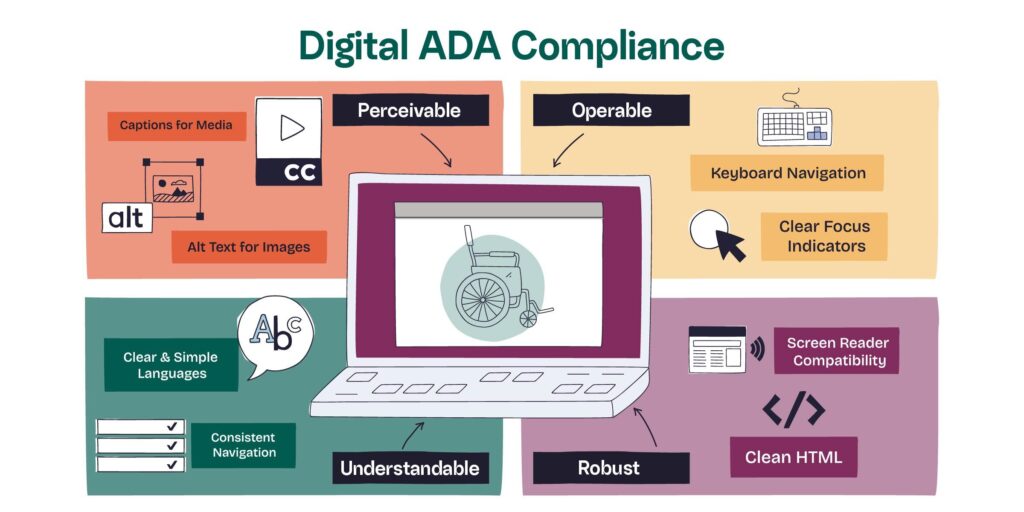
At BrandingCup, we use the acronym P.O.U.R. as a simple, memorable way to keep these principles front and center. When we build a website with accessibility in mind, we’re truly POURing from the BrandingCup.
Handy Website Checklist
Specific elements a web developer and designer must check for accessible graphic design services include the following:
- Fonts and Colors. Certain color combinations, hues, and shades may not be visible enough to those with impairments. Color contrast should be at an acceptable standard.
- Alt Text, Captions and Similar Labels. Images, videos and other media that may not be easily seen or heard by all users should be clearly labeled in a descriptive manner. (Accesible content creation)
- Contact Forms. The design, operation, and fields of all website forms must be checked to ensure users are able to understand what is required.
- Links. Anchor text should be clear and descriptive so users clearly know where it will take them.
- Overall Usability, Website Design and Functionality.
Understanding WCAG Compliancy Levels
The WCAG guidelines utilize a three-tier grading scale with the following levels: A, AA, and AAA. Each level has its own set of success criteria, with A being the easiest to achieve and AAA the most challenging.
- Level A – 25 Success Criteria Required
- This is the first level and easiest to meet. Most websites pass this level as it is the most basic and doesn’t affect major structural elements.
- Level AA – 38 Success Criteria Required
- At the second level, meeting these standards are a bit more strict. However, with this tier being one legally required for a majority of websites, it is the level that most development teams use as their goal.
- Level AAA – 61 Success Criteria Required
- This final level is understandably the most complex and hardest to meet. It is not necessary for every site to achieve this level and is meant for more specialist type websites.
Why Does ADA Compliance For Websites Matter?
Beyond being the right thing to do for your audience and community, ADA compliance is also required by law for most US businesses. It is also important for SEO and marketing purposes. If you wish to run an ethical company, avoid hefty fines, and keep your website aligned with marketing standards, ADA compliance is a vital step.
How Do I Check My Website for ADA Compliancy?
The good news is you don’t need to figure this out on your own. Although there are online checkers that scan your website for accessibility, we don’t recommend relying on these alone. These automated services are just a start and it’s still necessary for an expert to perform a manual check as well.
This is where our team can help. We are skilled at reviewing your website line by line, page by page, to bring it up to full compliance with ADA standards. And if you don’t have a website yet and need us to build it from the ground up, we always keep ADA guidelines in mind without sacrificing your overall website vision.
Limitations of Some Website Platforms
Note: There are common ADA challenges within WordPress websites if using theme builders like Elementor, and non-coded CMS like WIX, Framer, Webflow, that may not allow a developer to fully optimize a site. This includes:
- No code platforms require additional visual adjustments to ensure items and headlines are in the proper order and colors have enough contrast.
- Certain platforms allow developers to alter code using JavaScript, but the success of executing the script isn’t always guaranteed.
- Tools like AccessiBe and similar plugins help identify and implement accessibility improvements for your site, but sometimes have a heavy financial investment.
- Overall, a developer can only do so much. If ADA is a major priority for your website users, it’s important to invest in and properly use the right tools.
Take The Next Step: Get a Website Audit Today
Ready to begin? Don’t wait another minute. Give us a call and let us create the website of your dreams with ADA compliance in mind from the very start. Or allow us to review your current site for errors, inconsistencies and compliance issues. We’ve got it handled!